Posts

Log in Android

                       Trace Android Issues Log: The Android logging system provides a mechanism for collecting and viewing system debug output. Logcat dumps a log of system messages, which include things such as stack traces when the emulator throws an error and messages that you have written from your application by using the Log class. You can run LogCat through ADB or from DDMS, which allows you to read the messages in real time. This is like System.out in java or printf in C language. Where ever you want to trace the values you can use this. Types of logs: * Verbose - v(String , String) * Debug    - d(String , String) * Info        - i(String , String) * Warning - w(String , String) * Error      - e(String , String) We can also able to filter them. Example: int A = 10; ...

Fundamentals of Android

                                Fundamentals of Android These are the basic building blocks for android    * Activity * Service * Broadcast Receiver * Content Provider. Activity An activity represents a single screen with a user interface. The user can interact with the activity i.e. click the button. Service A service is a component that runs in the background to perform long-running operations or to perform work for remote processes. A service does not provide a user interface. Example:        Listening Music is the service. Because no user interaction is neccessary to play music. Once you start it will playing all the songs.   Content Provider A content provider manages a shared set of application data. You can store the data in the file system, an SQLite database, on the web, or any other persistent storage...

MD5 Encryption in Android

Image
Lets start the tutorial for md5 encryption in android. MD5 is the best practice to handle the secured data like password etc. In android we can able to achieve this using few simple code. Create new android project and copy and paste the below java code. import java.security.MessageDigest; import java.security.NoSuchAlgorithmException; import android.app.Activity; import android.os.Bundle; import android.view.View; import android.view.View.OnClickListener; import android.widget.Button; import android.widget.EditText; import android.widget.TextView; public class DataEncryptionActivity extends Activity {     String strNormalValue, strEncrytedValue;     EditText edtValue;     Button btnEncrypt;     TextView tvEncrypt;     /** Called when the activity is first created. */     @Override     public void onCreate(Bundle savedInstanceState) {    ...

Android Login Email & Password Validation

Image
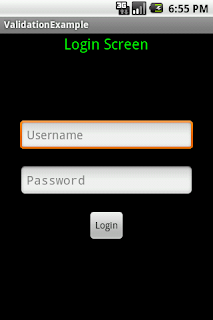
Here i going to validate the email and password. The complete source code for the LoginValidationProject follow my steps, Create the project with following attributes. Project name          : LoginValidationExample Build Target            : Android 2.1 Application name   : LoginValidationExample Package name         : com.android.dhamu.validation Create Activity       : LoginScreen Step 1:  Rename the main.xml file as login_screen.xml . Copy and paste the below xml coding in it. <?xml version="1.0" encoding="utf-8"?> <LinearLayout xmlns:android="http://schemas.android.com/apk/res/android"     android:layout_width="fill_parent"     android:layout_height="fill_parent"     android:orientation="vertical" >     <TextView  ...

Android TitleBar And CustomTitleBar

This is possible to handle the titlebar and also can able to customize it in android. We can do this via A) Adding xml code in AndroidManifest.xml B) Using java code by programmatically.                                     Working in AndroidManifest.xml Hide the Title Bar Using XML code. If you want to hide the title bar for particular activity, use the below code in AndroidManifest.xml within the <activity> tag.   android:theme = " @android:style/Theme.Black.NoTitleBar " Example:      < activity             android:name = " FirstScreen"             android:label = "@string/app_name"             a...